


[DISCLOSURE: This is not a beginners guide to Facebook Ads. We talk about advanced tactics in this post. For a beginners guide, click here.]
You’ve mastered the art of boosting posts… Or maybe you’ve got some appointments booked with Facebook video ads.
So, now what?
You’re ready to use some advanced Facebook Ad tactics. We’re going to dive into some video ad tactics with conversion tracking that are fantastic.
Why video ads?
10X Faster Growth
Well, Digital Marketer just released a full guide to Facebook video ads and the success stats are undeniable. According to the article, Facebook sees over 4 billion video views per day. And Statista.com recently found that Facebook has 1.65 billion monthly active users, which means people are viewing videos multiple times.
Digital Marketer points out that people are simply more likely to buy a product or take action after they view a video.
People Are More Likely To Take Action After Video
So, imagine if you could directly target people who are already interested in your services?
Digital Marketer says that you can build your retargeting lists 10X faster AND cheaper by creating custom audiences and we totally agree with them. After you’re finished up here, definitely head over and check out their guide.
They also give some great tips what components to include to create highly-viewable videos that your audience will not only love, but want to take action on.
It’s time to start getting those qualified leads directly from Facebook.
And today I’m going to show you two ways to do this through advanced Facebook ad tactics. You’re going to want to tune into the video above to see a step-by-step play of exactly how to set up these killer strategies on the backend of your LeadSite and Facebook ad account. And keep reading for a full breakdown of these fail-proof marketing hacks.
- Tip #1) Showing Ads Only To Buyers Or Only To Sellers
- Tip #2) Tracking Lead Conversions Directly On Facebook
Tip #1) Showing Ads To Only Buyers Or Sellers
If you have a LeadSite then you’re already familiar with Pixels.
This allows you to add retargeting, analytics and advertising pixels in a matter of seconds.
Here’s how you can use Pixels to send ads to only the buyers or sellers who’ve been visiting your website.
In order to get the top leads from Facebook, you need to be able to know what those folks are after and this means being able to retarget your ads for people who are visiting specific blog posts or web pages.
The first thing you need to do is set up a pixel. And you only need one pixel per Facebook ad account. So, go to the pixels section of your ad account, copy the code and paste it in the Facebook Retargeting section of your Pixels app, click save and you’re go to go.
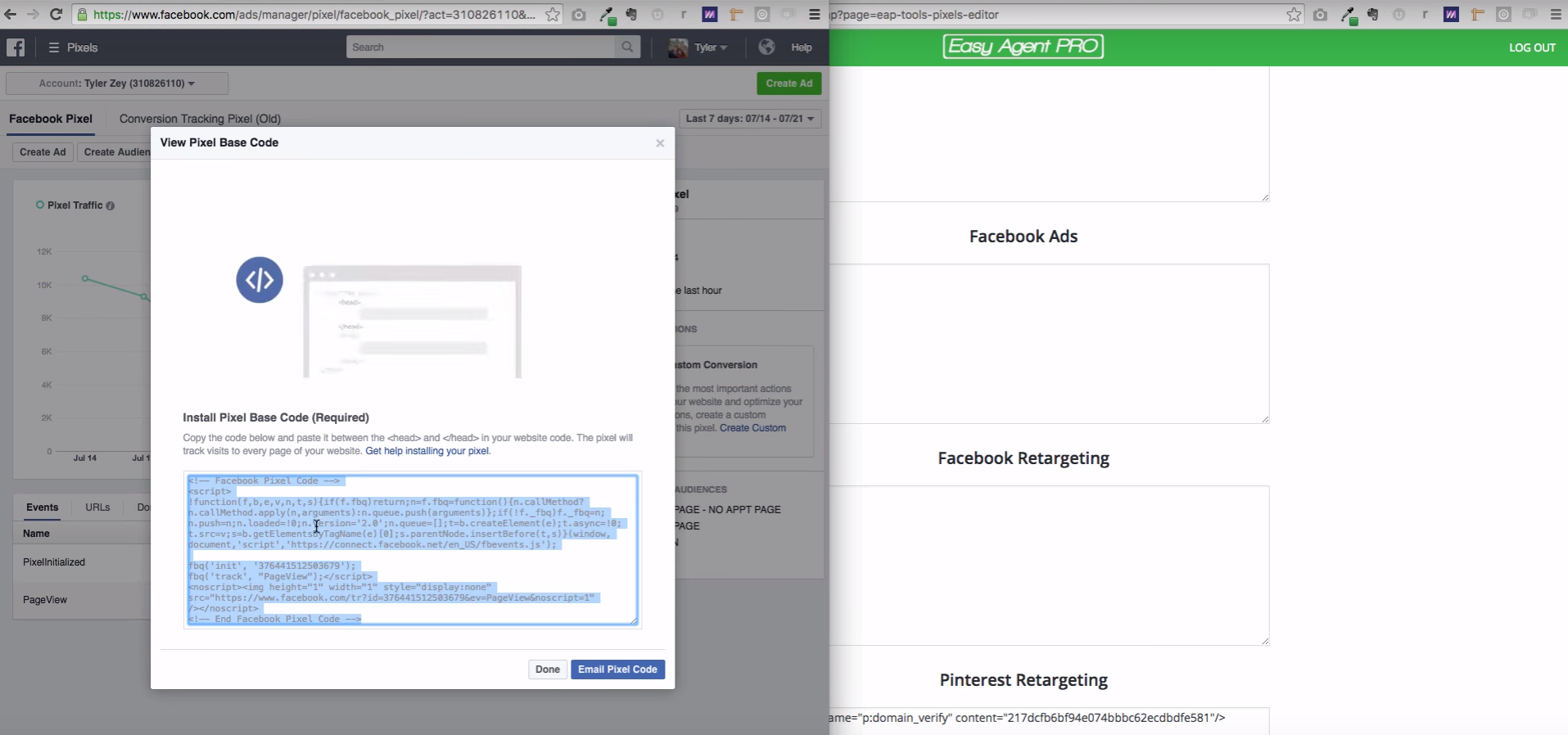
You can then start following all of your website visitors and begin creating video ads specifically for them.
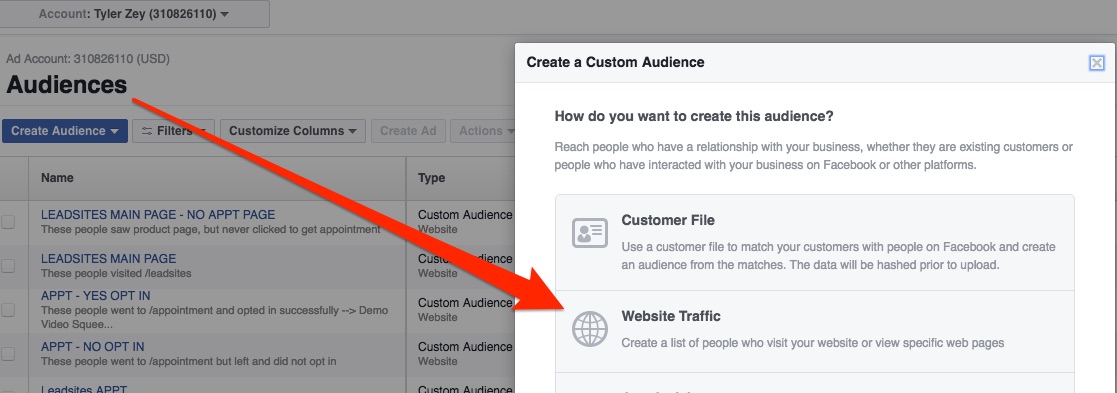
Once you have the pixel on your site you can now go to Facebook, create an audience and then select web traffic.
Do this here:
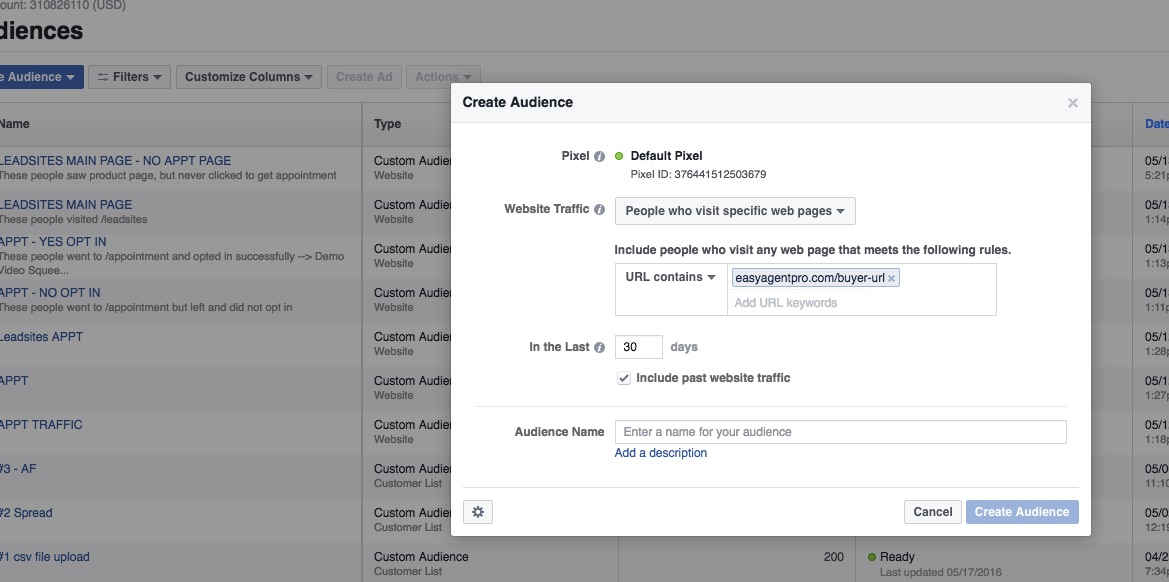
For instance, if you want to target buyers you can setup an audience based on your Home Buyers Guide landing page, or a blog post such as Is a Starter Home Right For You?
And now you can use the URLs of these pages to create a custom audience off of website traffic.
Like this:
So when you make your video, you can confidently speak directly to the people who are interested in buying property. Encourage them to leave you a comment on the video and then you can get in touch with them directly via Facebook Messenger. They don’t even have to provide their phone number or email. Plus, you’ll already have key, buyer-specific talking points to get the conversation going.
And you can do the exact same thing with sellers.
You’ll just be adding different URLs to link to pages and content that sellers are already engaging with on your website.
Tip #2) Tracking Conversions With Facebook Pixels
Next, we need to talk about conversions. This is also covered in the video above, to take a sec to watch it if you haven’t already and follow me through this process.
Running conversion-focused Facebook ad campaigns will help you increase conversions on your website. Facebook will track the ad each time it’s clicked to see if people are converting on your site. To get the most out of this ad experience, we’re pairing it with landing pages.
Our latest app called Squeeze lets you build custom landing pages literally by pointing and clicking. You can customize the image, call to action and all the text. Let’s say you create a page titled Be The First To Know About Hot Deals In Auburn.
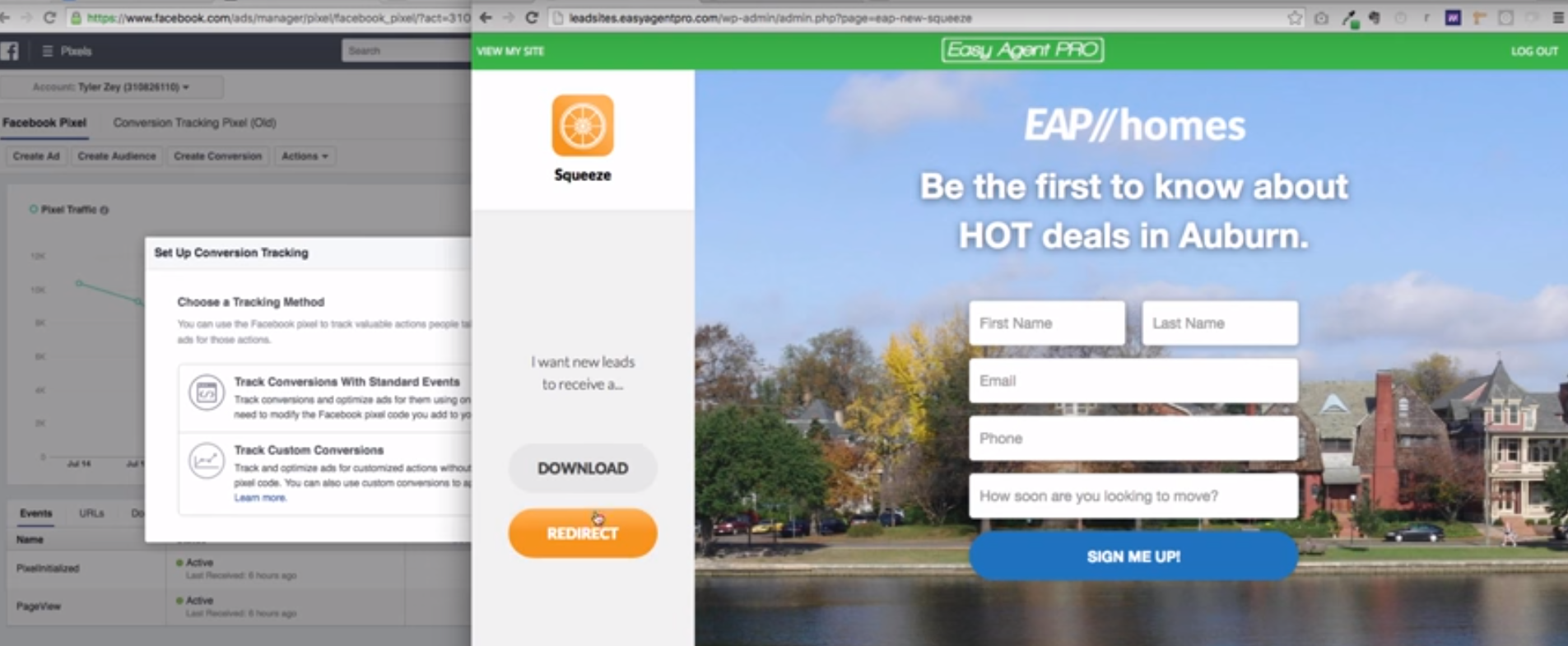
After you’ve got the page up, just copy the URL and redirect visitors to that page on your website with Squeeze.
Now, we can track the by setting up a custom conversion on Facebook, pasting in the landing page URL and naming the audience. Something like Auburn Hot Home Leads From Squeeze would work in this case.
Once you finish setting up the ad, you can track the conversion directly on Facebook.
And there you go!
Have you been playing with different Facebook ad types? Let’s chat about them in the comments below!