
How to use Market Reports to generate leads and grow your website

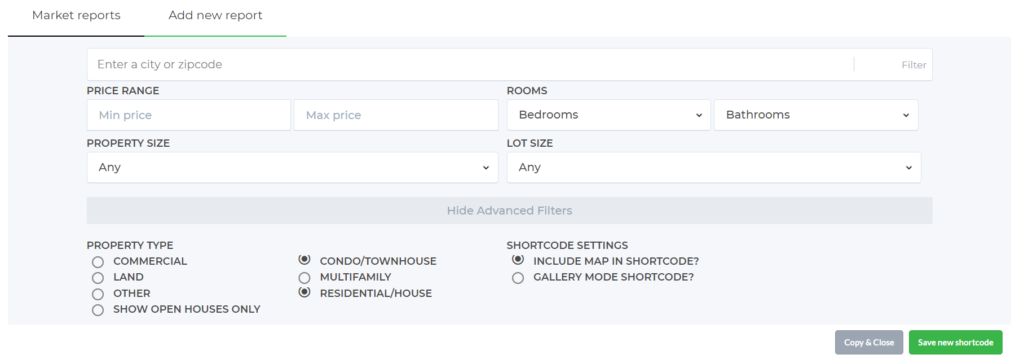
Market Reports are an exciting new take on an old classic; sharing data on markets your client is interested in through short-codes that can be integrated into various pages of your real estate website. The idea of being able to report on which neighborhoods are hot right now is nothing new, but being able to show your visitors this data has never been easier.
How to set up Market Reports
Setting up Market Reports is simple, if your website has a Market Report builder like Easy Agent PRO sites do. Simply create the report like you would a custom market, and save it as a short-code, which can then be pasted into the back-end of your website to display a Market Report of your choice to visitors.

On LeadSites, this is done in the Market Reports app (convenient, right?). Select the “New Market” button to access the IDX short-code builder, and build out your desired market.
Once you save it, you can copy and paste the short-code onto blogs, neighborhood pages, or any other page of your website that you feel could use a Market Report!

To the tech-illiterate out there, or even just the not-so-tech-savvy, the above may have seemed confusing, but I assure you, building out Market Reports through Easy Agent PRO is a breeze.
To walk through the process in person, or to see a Market Report live, schedule a demo with our team to learn more.
Jon Smith
Owner, Easy Agent Pro
Jon Smith owns Easy Agent Pro. He is a working real estate agent in Tullahoma, Tennessee, and the founder of CloseDaily. He builds the tools he wants for his own business, then shares them with agents everywhere.
More posts by Jon- 1Easy Agent Pro Has a New Owner
- 2Agent Website Platforms Compared: 2026 Pricing Guide
- 3How to Tell If Your IDX Is Worth Paying For
- 4How Blogging Helps Real Estate Agents Rank on Google (and Now AI Search)
- 5How Real Estate Agents Can Win More Leads Without Burning Out
- 6How to use Market Reports to generate leads and grow your website
 Real Estate News
 Easy Agent Pro Blog
 Lead Generation